Up to Speed with Delphi in a Day

The Delphi Programming Language
I have a prospective client who runs a small group of technology businesses, at least one of which integrates with clients using the Delphi programming language. One of the things the client said to me was, “Learn Delphi!”
Delphi is primarily used on Windows and includes an integrated development environment (IDE) from Embarcadero. The IDE is a tightly integrated, component-driven RAD environment, with a visual design surface where you place components and a code view where you wire up behavior.
If you’re writing Delphi applications, you don’t use VS Code, Emacs, or Vim — you use Embarcadero’s IDE, RAD Studio.
From Linux to Delphi on Windows
I’m a Linux guy—that’s my core specialty—but I am versatile. I downloaded the Windows 10 ISO from Microsoft, installed it in a VirtualBox VM, registered with Embarcadero, and installed RAD Studio - Community Edition.
Next, I created a GitHub repository, and set up a CNAME record so I could publish a polished website directly from the repo.
With the environment in place, I fired up the IDE, explored it briefly, and then dug in.
Bare-Bones Development Roadmap
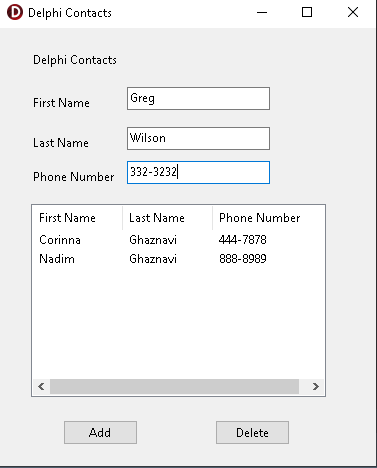
I’m a big believer in learning by doing, so my plan was to build a small app using Delphi. I settled on a simple contacts application to store names and numbers.
Since I was working in completely unfamiliar territory, I took the time to sketch out a minimal development roadmap:
- Phase I - UI Skeleton
- Phase II - In Memory Logic
- Phase III - DB Integration
- Phase IV - Replace the In-Memory List with the DB
- Phase V - Extend the App
- Phase VI - Code Review
- Phase VII - Documentation
Lessons Learned
I’m happy to report I only twisted the project into a pretzel once, where I had to rescue it using Notepad++, and lessons were learned:
- Use the IDE when renaming components — avoid the pretzel
- Use good names for UI components — the code becomes self-documenting
- Planning matters — the phased approach paid off
Conclusion
I was pleasantly surprised at how quickly I was able to build a working application using Embarcadero’s RAD Studio. I expected the experience to be more of a grind, but it turned out to be engaging — and even enjoyable.
If I were tasked with building a GUI application on Windows, Delphi would be a strong contender.
More than anything, this exercise reinforced something I rely on in my work: the ability to step into an unfamiliar environment, get operational quickly, and move from exploration to a working system in a short amount of time. In that context, Embarcadero’s RAD Studio wasn’t just another piece of technology to learn—it proved to be an enabler.