Git Automation
Some of you may have read my Git Battles post, where I talked about how I developed and a documented a Git workflow.
The natural next step was to automate the process.
I did that. I now have a new_release.sh script. Here’s a partial run:
dan@sally:/opt/dev/cmdb$ ./scripts/new-release.sh 1.6.0 "Carbon"
[ PASSED ] Validate release arguments
[ PASSED ] Check local release prerequisites
[ PASSED ] Fetch refs from origin
[ PASSED ] Check remote refs and branch ancestry

CMDB release summary:
  Source:       feat/maint-1.5.1
  Tag:          v1.6.0
  Message:      Release 1.6.0: Carbon
  Codename:     Carbon
  Next branch:  feat/maint-1.6.1
  Remote:       git@github.com:NadimGhaznavi/cmdb

Create and push this release? [y/N] y
[ PASSED ] Confirm release
Switched to branch 'dev'
[ PASSED ] Switch to dev
Merge made by the 'ort' strategy.
 CHANGELOG.md                          |  13 +++++
 cmdb/activity/InventoryCoordinator.py |   7 ++-
 cmdb/interface/Network.py             |  20 +++++++-
 index.md                              |   2 +
  .
  .
  .
[ PASSED ] Push release refs atomically
Switched to a new branch 'feat/maint-1.6.1'
[ PASSED ] Create next feature branch feat/maint-1.6.1
[ PASSED ] CMDB release v1.6.0 published successfully.
dan@sally:/opt/dev/cmdb$
As you can see the script automatically creates the new branch and drops me there.
You may have also noticed the Codename field I use. That shows up in my GitHub release.

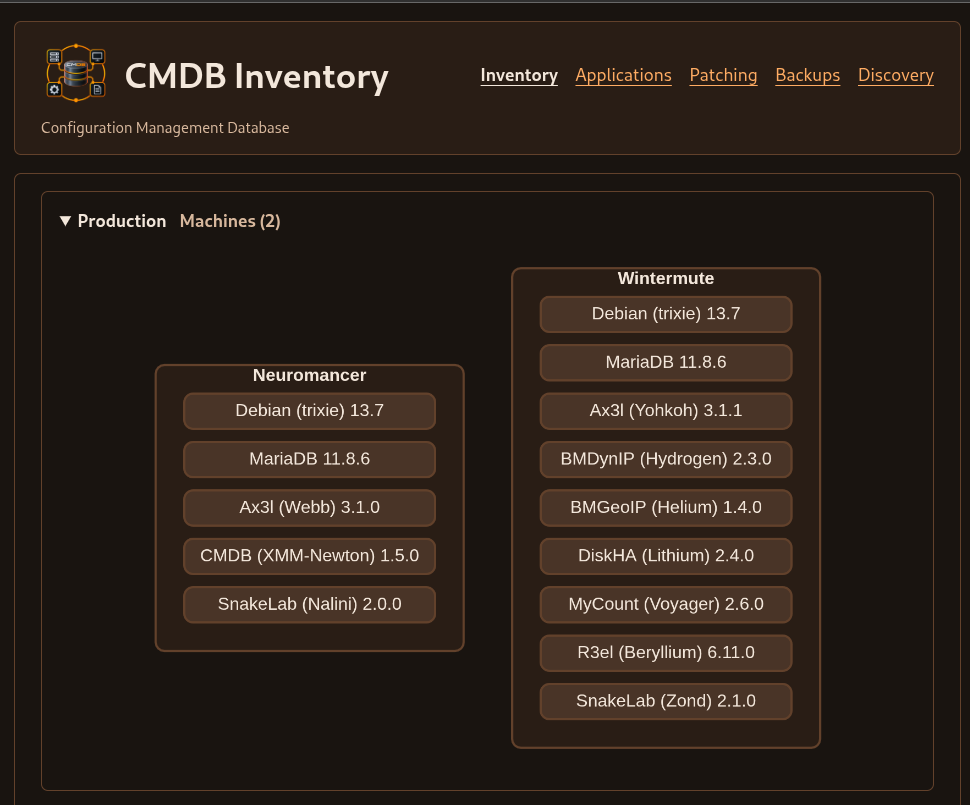
I have an inventory, patching, metadata repo that also picks up the codename, it’s more human-friendly to read. It gives me a snapshot of the different projects in my environment.
You can build all sorts of hooks around your Git release management. Your imagination is the limit!